SecuSteri Standard or Pro?
Both plans give you full sterilization traceability: your autoclave's own report read automatically, loads signed with a PIN, a QR label on every pouch, the compliance report and the audit log. Pro saves you time. This page shows exactly where.
| Feature | Standard | Pro |
|---|---|---|
| Price | €29/month excl. VAT | €69/month excl. VAT |
| Autoclaves | 1 autoclave | 3 autoclaves |
| Data retention | 5 years data retention | 10 years data retention |
| Label printing (PDF) | ||
| Autoclave checks | ||
| Compliance report | ||
| Compliance audit logs | ||
| Custom label designer | — | 1 custom label template |
| AutoReport | — | |
| SecuSteri Print | — |
How many autoclaves does each plan cover?
Standard covers one autoclave, Pro up to 3; if you run more, talk to us about Clinic+. If you move from Pro to Standard, only your first autoclave stays active: the others keep every load and label they ever recorded, but no new loads can be added to them until you return to Pro.
How long do your records stay visible?
Standard shows the last 5 years of loads, labels, checks and audit log entries; Pro, the last 10. Nothing is deleted at the edge of that window: older records are hidden, and moving to a higher plan brings them back into view.
What labels can you print?
Every plan prints a traceability label for each instrument pouch, from three built-in templates — S 38 × 25 mm, M 50 × 25 mm and L 60 × 40 mm — carrying a QR code, the instrument name, the load number, the autoclave, the expiration date and the signer. The QR code holds the pouch's tracking number: scanned into your patient or client management software, it ties the instrument to the signed load and to its autoclave report.
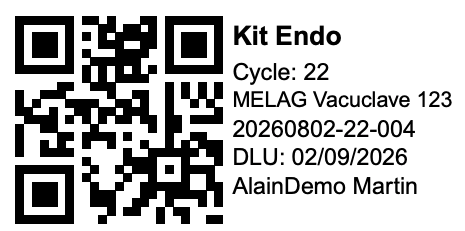
Pro adds the label designer, to build a label of your own: another size, the fields and wording you choose, and a QR code that can carry several fields separated by TAB or another separator, so one scan fills several fields of your software at once.
How does the autoclave's report reach SecuSteri?
Your autoclave writes a report file at the end of every cycle; SecuSteri reads it and creates the load, on every plan. Without AutoReport, you carry that file over on a USB stick or an SD card and upload it under Loads → Import Load. With AutoReport (Pro), a small program on the computer connected to your autoclave sends each new file to SecuSteri the moment it appears, so the load is already in your account when you come to add its instruments.
How do you print the labels?
SecuSteri is a web application and cannot reach your label printer by itself. Without SecuSteri Print, it generates the labels as a PDF that you print from a computer where the label printer is installed: two steps, from that computer. With SecuSteri Print (Pro), a small program on that computer receives the labels from SecuSteri, and one click prints them from any device — computer, tablet or phone, on the premises or not.
Can you change plans later?
Yes. The 30-day trial includes every feature, so you choose with the whole product in hand. Moving from Standard to Pro takes effect at once; from Pro to Standard, at the end of the current billing period. Yearly billing gives two months free on either plan. After a move to Standard, AutoReport and SecuSteri Print stop, autoclaves beyond the first become inactive as described above, and your custom label template stays in your account but can no longer be the default.
See also
Try SecuSteri free for 30 days
The trial includes every feature of both plans: choose once you have seen them at work.